 Cloud & Business Apps
 Cybersecurity
 Data & AI
 IoT & Connectivity
 Industry
 Health
 Banking and Finance
 Public Sector
 Retail
 Tourism and Leisure
 Transport & Logistics
 Energy & Utilities
 Smart Cities

How to protect social media accounts and prepare for recovery
Social media makes it possible to stay in touch with other people, share experiences and carry out professional activities. For retailers, content creators and businesses, it is also a channel for customer engagement, customer service and reputation management and, in some cases, a source of income.
Losing access to an account can disrupt communication with customers and contacts, damage digital reputation and disrupt the continuity of certain professional or commercial activities, or even bring them to a halt.
An incident may begin with stolen credentials, a lost mobile phone or an unauthorised change to sign-in details. Reviewing security settings and preparing recovery mechanisms while the account is still accessible can reduce risk and make it easier to respond if access is lost.
■ Although the features available vary between platforms, there are several checks that can be included in regular security reviews of personal, professional and business accounts.
Review the account security settings
The first step is to review the security settings on each social network: which sign-in methods are enabled, which devices are currently signed in and what options are available for recovering the account.
 If a password is used, it should be long and unique to each service. A password manager can generate and store passwords so users do not have to remember them all. These measures are consistent with CISA's recommendations for protecting personal accounts. Reusing a password puts multiple accounts at risk if one of them is compromised.
Two-step verification should be enabled whenever it is available. It adds an extra check to password-based sign-in, such as a code generated by an authentication app. Where the platform offers a choice, an authentication app reduces reliance on the mobile network to complete verification.
Codes sent by SMS still provide additional protection compared with using a password alone, although they can be affected by attacks that compromise the phone number. The differences between methods are explained in Google's two-step verification guide.
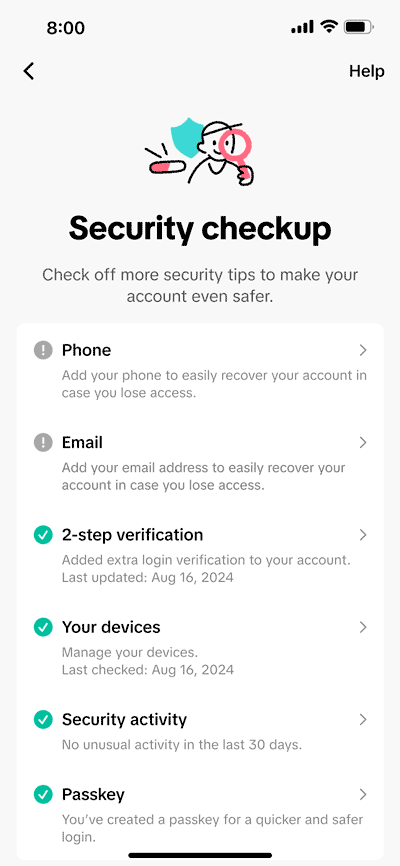
TikTok, for example, offers an account security check-up that allows users to review contact details, enable two-step verification, check connected devices and look for unusual activity.
■ It is worth checking which features are available on each platform: setting a profile to private helps control the visibility of content, but does not by itself protect the account from unauthorised access.
Understand passkeys
Some services also allow users to use passkeys, a sign-in method that allows users to sign in by unlocking their device, without entering the account password.
Passkeys are resistant to phishing because they are bound to the legitimate service they were created for. On a Google Account, a passkey is used through the device's unlock mechanism, such as a fingerprint, facial recognition or PIN. Google's guide to passkeys explains how to set them up.
■ It is advisable to create passkeys only on personal devices that remain under the user's control and to secure the device's unlock method. Before changing mobile phones, it is worth checking how passkeys will be transferred or recovered on the new device and which alternative method will be available if needed.
Prepare for account recovery before it is needed
Recovery details deserve as much attention as sign-in details. An old phone number or an email address that is no longer in use can make it harder to recover an account.
These are some of the options worth reviewing:
- Associated email address and phone number. They should still be under the user's control and remain accessible.
- Backup or recovery codes. If the platform provides them, they should be stored somewhere secure that can still be accessed if the mobile phone is lost. The only copy should not be kept inside the account that may need to be recovered.
- Alternative methods. It is important to check which options the service supports for verifying identity when the usual device is unavailable.
Google backup codes, for example, are generated in advance as a set of one-time codes that can be used to complete two-step verification when the usual method is unavailable. They can be downloaded or printed and stored somewhere secure, and each code can be used only once.
Each platform has its own recovery procedure. Some may require additional identity checks, but the requirements depend on the service and the circumstances. If documentation needs to be provided, it should only be submitted through the official recovery process. Documents should not be posted on the profile or sent to anyone who contacts the user via private message.
■ Preparing an alternative way to regain access reduces dependence on a single device. For corporate accounts, recovery should not depend exclusively on the devices or contact details managed by a single person.
Check who still has access
It is advisable to review active sessions and linked devices regularly. Access may still be active on a mobile phone that is no longer used or on a shared computer where the user did not sign out. Unnecessary access should be removed and any unrecognised activity should be investigated.
The same review should be applied to applications and services connected to the account. A tool used only once may retain permissions it no longer needs. It is also particularly important to secure the associated email account, as it often serves as a recovery channel and destination for security alerts.
Google's guide for compromised accounts includes reviewing devices, authorised applications and changes to recovery details. For email, it also recommends checking that no unknown forwarding rules have been added.
■ For accounts managed by several people or by external agencies, it is also worth reviewing who still has administrative permissions and removing access when responsibilities change or a collaboration comes to an end.
Use email aliases, but understand their limitations
Another option that can help organise and track incoming email is to use variations of an email address.
In Gmail, for example, messages sent to usuario+redsocial@gmail.com arrive in the same inbox as those sent to usuario@gmail.com. This feature makes it possible to create filters and organise email, provided the service being used for registration accepts that format.
It is not a barrier against account takeover either: anyone who knows the address can identify its base form. Its value lies in organisation and tracking, and it does not replace a unique password, additional verification or access reviews.
■ If unexpected messages are received at a variation reserved for a particular service, that may provide a clue when investigating how the address has been used. On its own, however, it does not prove who disclosed it.
What to do if you lose control of an account
If posts or messages appear on a social media account or channel that were not sent by the user or account owner, or account details change without their involvement, the response should begin through the official app or website.
- If the account is still accessible, review the recovery details, change the password and sign out of any unrecognised sessions. If there are signs that the device itself may be compromised, it is advisable to recover the account from another trusted device and check the affected device before entering credentials again.
- If the account can no longer be accessed, the platform's recovery procedure should be started. Meta, for example, provides an account recovery and support centre for Facebook, Instagram and Threads. It is important to follow the instructions that apply to the specific situation.
■ It is also advisable to alert contacts through another channel if fraudulent messages have been sent from the profile. Once access has been recovered, permissions, authentication methods and recovery details should be reviewed again. Passwords and verification codes should never be given to third parties who claim they can recover the account.
A security review you can carry out today
A basic review can start in the security settings of a social media account: a unique password or passkey, additional verification, up-to-date recovery details and an alternative method if the mobile phone is lost. It is then worth reviewing the devices and applications that have access.
Including these checks in regular security reviews helps reduce the likelihood of losing control of an account and, if it does happen, makes recovery faster, more structured and less disruptive to day-to-day activities.
Checklist
Before considering the review of a personal or corporate account complete, check that:
▢ The password is unique to that service, or a passkey is used where available.
▢ Two-step verification is enabled and the configured method can still be used.
▢ The recovery email address and phone number are up to date.
▢ There is an alternative way to regain access if the mobile phone is lost or the primary method becomes unavailable.
▢ Backup codes are stored outside the account itself, if the platform provides them.
▢ All devices and active sessions are recognised and those no longer in use have been removed.
▢ Connected applications and services are still needed and do not retain unnecessary permissions.
▢ The associated email account is also protected, because it may be used to restore access.
▢ For corporate accounts, access and recovery do not depend on a single person, and employee or supplier permissions are reviewed when their responsibilities change.
▢ The platform's official recovery procedure is known before it is needed.
▢ If suspicious activity is detected, recovery is started through official channels and passwords or codes are not shared with third parties.
______

—This article is an updated and expanded version of "How to protect your social media accounts", published in October 2022 by Diego Samuel Espitia.