 Cloud & Business Apps
 Cybersecurity
 Data & AI
 IoT & Connectivity
 Industry
 Health
 Banking and Finance
 Public Sector
 Retail
 Tourism and Leisure
 Transport & Logistics
 Energy & Utilities
 Smart Cities


Digital legacy: how to prepare accounts, profiles and content
Planning a digital legacy means deciding what will happen to photographs, documents, accounts, social media profiles and subscriptions when their owner can no longer manage them: what to preserve, what to pass on and what to delete. In some cases, depending on the service and the features it offers, it is possible to configure options that make it easier for those decisions to be carried out.
______
Not all accounts serve the same purpose. For example, email can be used to recover access to other accounts; a mobile phone may contain active sessions and verification factors; and Cloud storage holds documents, photographs and backups. In many cases, personal accounts also provide access to work-related services or services used by a small business.
When the account holder can no longer manage their accounts, family members or other people close to them may struggle to work out what each account is used for and how the accounts are connected if they do not know which ones exist or, where applicable, what plans the account holder had made for them. As a result, some content may become inaccessible, while recurring charges may continue for services that nobody knows how to manage. Even when the accounts have been identified, the provider will probably need to verify that the person requesting access is authorised to do so.
When the account holder leaves instructions, there is less uncertainty. But for those instructions to be useful, it is important to distinguish between what they want to happen to each account and what the service actually allows.
To decide what should happen to an account, you need to know what the service allows.
Three decisions for organising a digital legacy
A digital legacy includes content, accounts, access rights and instructions about what should happen to them. A family photo album, an email account and a subscription do not have the same value or require the same treatment, so it is necessary to create an inventory and decide what should happen to each account or piece of content:
- Preserve. Identify memories, documents or posts that are valuable to other people and check whether the service allows them to be downloaded or passed on.
- Pass on or delegate. Where the service allows it, designate someone who can receive certain data or carry out specific actions. This does not necessarily mean sharing the password or handing over full control of the account.
- Delete or cancel. Decide whether a profile or certain data should be deleted, or whether subscriptions should be cancelled. Before deleting an account, check which linked content and services could be affected.
■ In this way, the account holder can decide which actions to authorise for the future and make the necessary arrangements so that those decisions can be carried out, without granting immediate access to their accounts.
Account recovery is not the same as planning a digital legacy
When planning a digital legacy, it is important to distinguish between account recovery methods and digital legacy features:
- Recovery methods are common and allow account holders, while they are still able to manage their account, to regain access if they forget their password, lose their phone or detect unauthorised access.
- Digital legacy features are not available on every service and allow users to plan what will happen to their account when they can no longer manage it. Their scope varies: some apply after the account holder's death; others are triggered after a period of inactivity, regardless of the reason.
■ To activate digital legacy features, the designated person may need to provide documentation or wait until the relevant conditions have been met, depending on the service.
How to prepare a digital legacy that others can use
The first step is to identify the key accounts for information, identity and payments. The next is to decide what should happen to them and check how those decisions can be put into practice on each service. This does not require sharing passwords or leaving email or a mobile phone permanently accessible.
It is important to check the scope of each option: designating a contact does not transfer ownership of the account or grant unrestricted access. This preparation does not replace a will or resolve by itself any legal issues that may arise.
The instructions must be usable without relying on the account holder's email or mobile phone.
Email and mobile phones deserve particular attention because they bring together notifications, active sessions and verification factors. The procedures for each service should be documented. Any dedicated legacy access keys and required documentation should be stored in a secure location, separate from the account holder's email or mobile phone and easy for the designated person to find. This is not the same as authorising the use of the account holder's usual credentials. From there, the plan can be organised into five steps:
- Create an inventory. Identify and prioritise the main email account, Cloud storage, social media profiles and subscriptions. If a personal account provides access to business profiles, domains, billing or other services used by a small business, record that dependency as well.
- Define what should happen. Specify what should be preserved, passed on, memorialised, cancelled or deleted. Not everything has to go to the same person.
- Configure the available options. Check whether each service offers legacy or trusted contacts, inactivity settings, data downloads, memorialisation or future deletion. Simply finding the feature is not enough: the chosen configuration needs to be completed.
- Communicate and protect the instructions. Explain to the designated person what role they have been assigned and where they can find the inventory, dedicated legacy access keys and any necessary documentation. This information should be protected and easy to locate, without creating uncontrolled copies of passwords.
- Review changes. Update the plan whenever accounts, designated people or platform features change.
■ For each account, it should be clear what the account holder wants to happen and what the designated person needs, or will need, to make that happen.
Platforms take different approaches to digital legacy
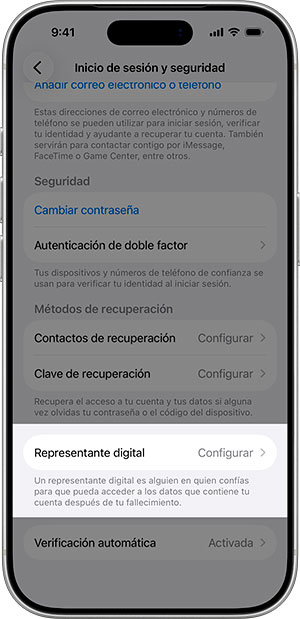 The requirements, data available and actions permitted vary from one service to another. For example:
- Google. Inactive Account Manager lets users decide how long an account should remain inactive before the plan is triggered, choose up to ten people and specify which data each person should receive, although some types of data cannot be shared. Users can also choose to have the account deleted.
—Google's inactive account policy is separate: Google may delete a personal account, together with its activity and data, if it considers the account inactive. - Facebook. In its official guidance on legacy contacts, Meta sets out two options for what happens after an account holder dies: appoint someone to manage certain aspects of the memorialised profile, or choose to have the account permanently deleted.
—The legacy contact cannot log in as the account holder or, for example, continue posting as them or read their private messages. - Apple. Apple allows users to designate one or more Legacy Contacts (shown on the right in iOS) who can request access to certain account data after the account holder dies. They need the access key generated when they were designated and, as a rule, a death certificate; the documents required vary by country or region.
—Access does not necessarily include data stored in iCloud Keychain and may exclude films, music, books or subscriptions.
■ Before setting up the plan, it is worth checking which features are available at that time, including what they are called, as well as the scope of each feature and any documentation that may be required in each case.
A plan that other people can put into practice
In addition to deciding what should happen to photographs, social media profiles and other services, the plan should include the services the account holder subscribes to and the accounts that provide access to other resources. If these dependencies are not documented, managing them may require numerous requests and verification checks, and some content could become inaccessible.
Platform features make certain actions possible, but they do not define what the account holder wants or replace their instructions. To make sure the plan is workable, it is worth checking whether the designated person will be able to identify the accounts, find the instructions and follow the procedure for each service. Any questions that arise can help clarify outstanding decisions, check the required documentation and complete any options that have not yet been configured.
This review should be repeated whenever accounts, services or designated people change. Keeping decisions and instructions up to date makes it easier for the people who need to act on them to know where to start when the time comes.