 Cloud & Business Apps
 Cybersecurity
 Data & AI
 IoT & Connectivity
 Industry
 Health
 Banking and Finance
 Public Sector
 Retail
 Tourism and Leisure
 Transport & Logistics
 Energy & Utilities
 Smart Cities

NotebookLM and lifelong learning: turning documents into actionable knowledge with AI
It’s often said that many of the jobs of 2030 don’t yet exist. In a world where information is growing exponentially, lifelong learning is no longer optional: it’s essential, both professionally and personally.
Continuous learning not only helps acquire new skills, but also fosters the mindset needed to adapt to change and seize new opportunities. But learning isn’t always easy. The sheer volume of information can be overwhelming, and finding the time and effective methods to organise and understand new concepts remains a challenge for many.
Continuous learning ensures mastery of new skills and cultivates the right mindset to embrace new opportunities.
In this context, AI is beginning to play a key role by offering new ways of acquiring knowledge, structuring it, making it easier to understand and more accessible. This is where tools like Google NotebookLM reveal their potential.
What is Google’s NotebookLM?
Google NotebookLM is an AI-powered learning tool designed to work directly with a user’s own documents. It enables users to transform extensive content, such as academic papers, technical manuals or class notes, into clearer, more dynamic and easier-to-use study materials.
The tool uses AI to analyse and reorganise information based on individual needs, adjusting content depth, overcoming language barriers and facilitating the understanding of complex topics.
Thanks to its analytical and summarisation capabilities, NotebookLM helps identify key concepts, generate summaries, and create interactive formats that support a more structured and engaging learning process.
AI is increasingly proving its value as a learning support tool, capable of optimising time and improving the learning experience.
AI has become a powerful tool for learning.
How to use NotebookLM for learning
The first step with NotebookLM is to upload one or more documents related to the topic you want to study: PDFs, Word or Google Docs files, spreadsheets, videos, podcasts or web pages. This might include, for example, a specialised Cyber Security whitepaper or a scientific article on microbiology.
Once uploaded, the content is organised into what are known as Notebooks. Each notebook can combine multiple sources, including personal notes converted into text. From there, the AI analyses the full body of content and extracts its main sections to transform them into study materials in the language of your choice.
From a single source, users can generate study guides highlighting the most relevant points, briefings that summarise core ideas, frequently asked questions or glossaries of key terms… All of this supports better information retention and easier reference throughout the learning journey.
■ The interactive audio summary mode also allows users to interact with content using voice, offering an experience similar to attending a class.
Key educational features in NotebookLM
- Summary document
This feature creates clear, structured summaries that help quickly identify a document’s key points, maintaining coherence and ensuring all essential information is included.
—For instance, when working with the whitepaper Generative AI Agents: Architecture, Tools, and Applications, NotebookLM can summarise in Spanish the core concepts around AI agent architecture, the tools used, and their main use cases, offering a quick and comprehensive overview of the content.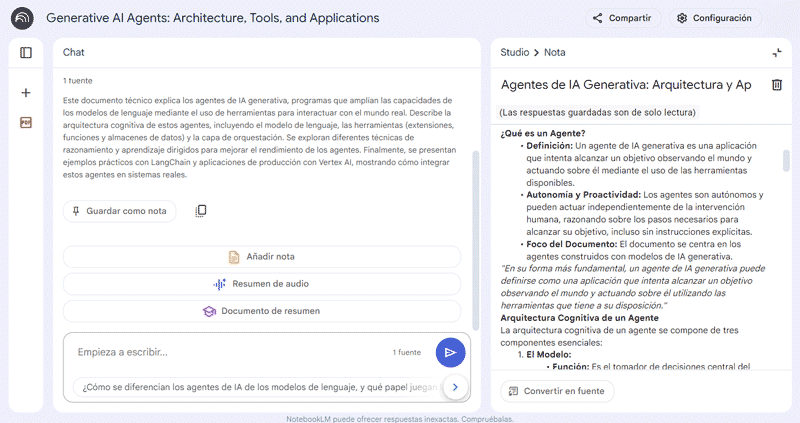
- Study guide
NotebookLM enables users to create personalised learning paths, breaking down complex topics into more manageable chunks. Users can request specific explanations or receive guidance on how to explore a certain topic in more depth.
—Continuing the same example, users can request a learning guide to understand how different prompt engineering frameworks like ReAct, Chain-of-Thought or Tree-of-Thoughts, influence reasoning and decision-making in AI agents.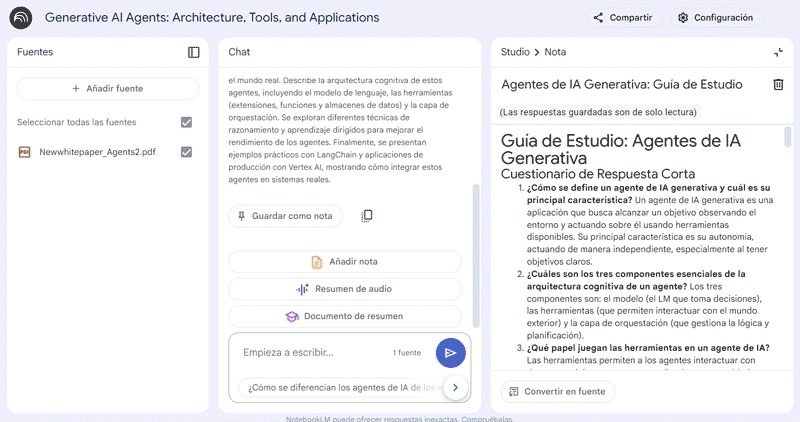
- Frequently asked questions (FAQ)
One of NotebookLM’s standout features is its dynamic interaction. Users can ask specific questions based on their documents and receive responses directly linked to the original material, or even request an automatically generated list of FAQs.
—For example, you can ask what the key difference is between AI agents and language models, and get a response tailored to the analysed content.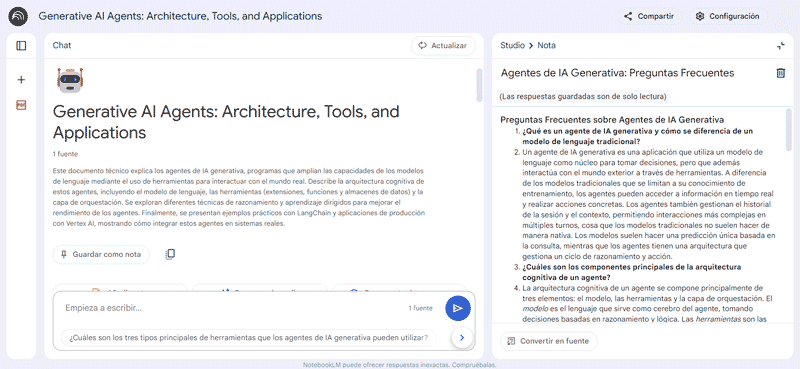
- Adding notes
This feature allows users to add personal notes and link them to the original documents. This makes it easier to access key ideas while keeping all relevant information centralised and organised.
—While studying a document, you can expand on specific use cases, link those notes to the relevant sections, and use them as additional sources within the notebook itself.
■ You can add or remove sources at any time and in various formats, expanding the context or bringing in new perspectives related to the topic. Continuing the example, you might want to add the publication Building effective agents to the initial whitepaper to enrich the range of approaches or implementation examples.
- Timeline
Depending on the type of content and information available, NotebookLM can generate timelines that highlight key events and stakeholders.
—This feature is particularly useful when studying historical events, as it helps visualise how events unfolded and the roles played by each actor. - Interactive mind maps
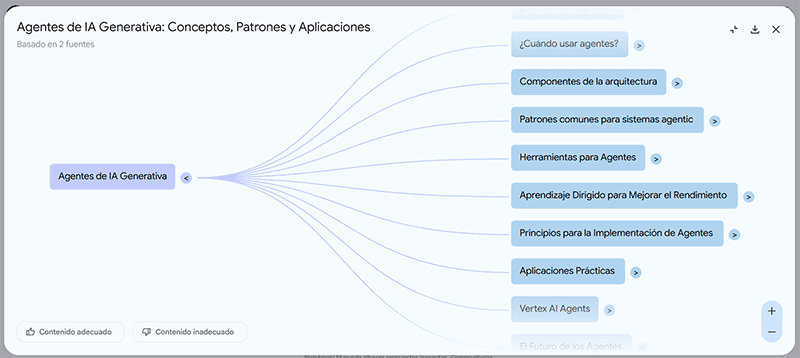
NotebookLM includes the automatic generation of interactive mind maps that organise information into visual diagrams.
These maps enable quick visualisation of key concepts, dynamic exploration of subtopics through expandable nodes, PNG export, and full integration with other features, including the ability to add notes to each node.
Lifelong learning: the key to expanding knowledge
Ongoing learning keeps curiosity alive and makes it easier to explore fields that might otherwise seem out of reach. Tools like NotebookLM, along with other language models used for educational purposes, help accelerate content assimilation and personalise the learning experience.
Combining technology and education reinforces the idea that knowledge is a shared resource, accessible to everyone with the right tools.

Updated: 01.15.2026